
TCA MCP Server
The TCA MCP Server supports the MCP protocol, enabling rapid initiation of code analysis and obtaining code analysis reports via AI Q&A.
Tips
The TCA MCP service is hosted on Tencent Cloud MCP Square, and the source code for the TCA MCP Server can also be accessed from the open-source repository.
It is recommended to use Tencent Cloud CodeBuddy and install the TCA MCP Server in its MCP Marketplace.
Usage Guide
First, create a
teamandprojecton TCA (if they already exist, you can skip this step), connect to the code repository to be analyzed, configure the analysis scheme as needed, and create an analysis project. For details, refer to Quick Start.Create a
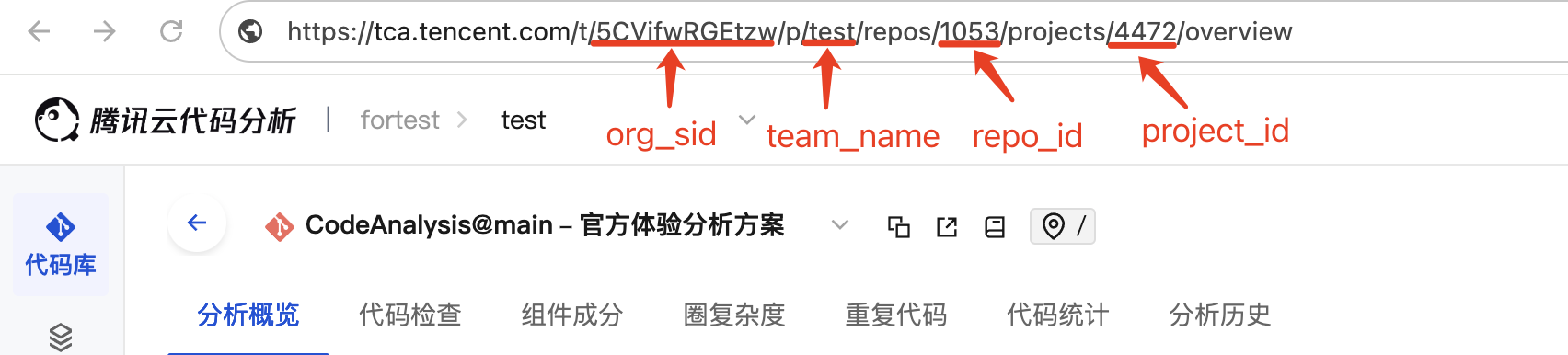
tca-mcp.iniconfiguration file in the code repository. The configuration file is stored in the root directory of the code repository, and its content is as follows:[config] org_sid=<org_sid> team_name=<team_name> repo_id=<repo_id> project_id=<project_id>The relevant parameters can be obtained from the routes on the corresponding pages, as shown in the following figure:
Configure the TCA MCP Server:
{
  "mcpServers": {
    "tca-mcp-server": {
      "command": "npx",
      "args": ["-y", "-p", "tca-mcp-server@latest", "tca-mcp-stdio"],
      "env": {
        "TCA_TOKEN": "<TCA_TOKEN>",
        "TCA_USER_NAME": "<TCA_USER_NAME>"
      }
    }
  }
}
The corresponding TCA_TOKEN and TCA_USER_NAME can be obtained from Personal Center - Personal Token.