
Optimizing Analysis Speed
Analysis speed is a key metric that business teams typically focus on. When a business initiates a code analysis, it goes through the following process:
Task Creation and Initialization: Create a task, initialize pre-required data, and add it to the execution queue.
Parallel Execution of Subtasks: Client nodes competitively acquire analysis subtasks, pull the code repository, execute code analysis, generate task data after completion, and report it to the server.
Data Storage and Analysis Completion: The server processes the data, stores the analysis results in the database, and completes the analysis.
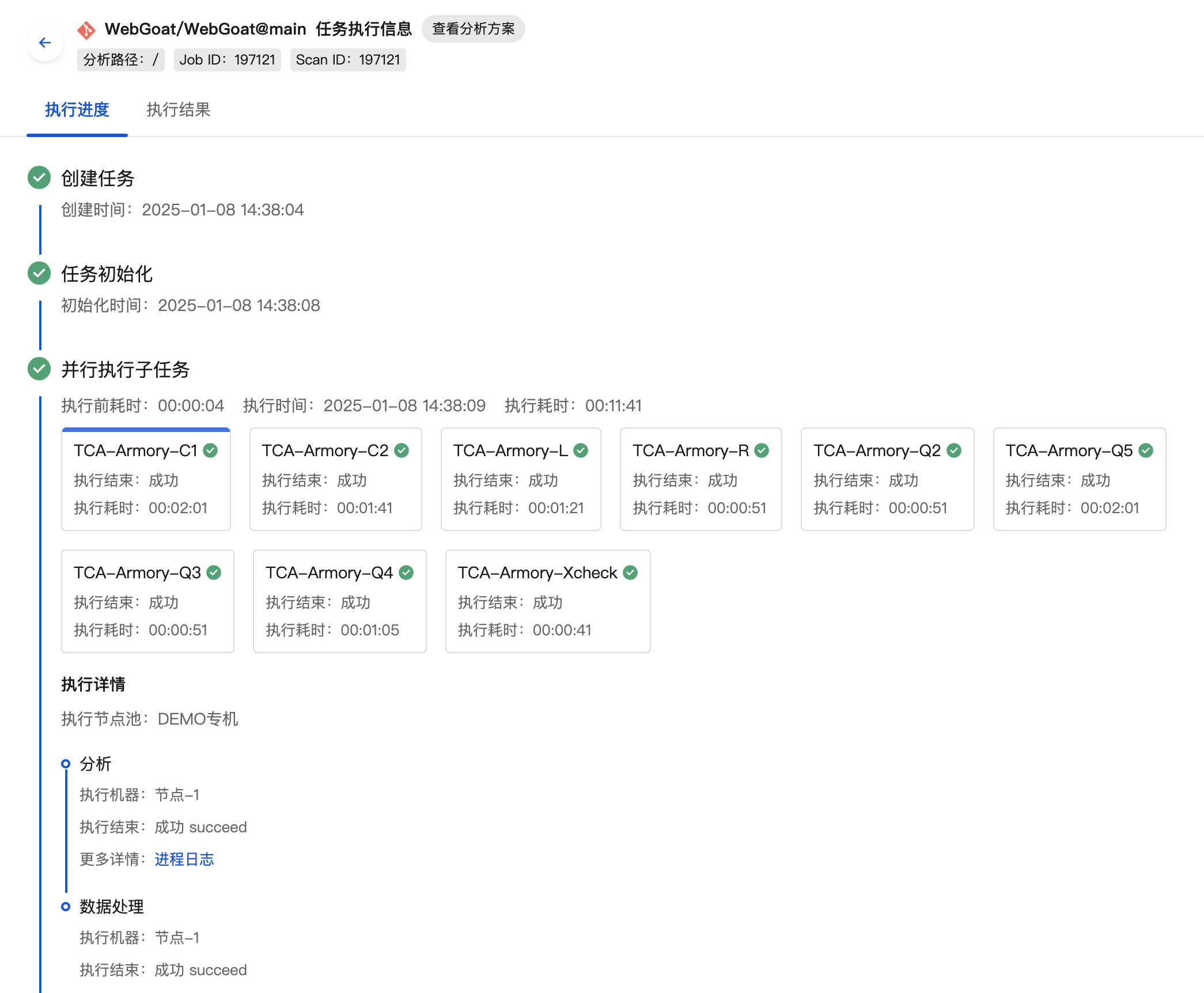
When business teams report long analysis times, we generally analyze the root causes based on the analysis progress (Analysis Project > Analysis History > Details).
1. Analysis of Factors Affecting Analysis Speed
Analysis duration is influenced by multiple factors. Based on Tencent Cloud Code Analysis (TCA)'s years of practical experience within Tencent, the main causes of delays are as follows:
Impact of Code Repository Size: Code analysis involves pulling code from the repository. Larger repositories, especially large monorepos, incur higher code-pulling overhead.
Impact of Code Compilation During Execution: Code analysis shares fundamental principles with compilation. If compilation-type rules are selected and compilation commands are configured, compilation time will increase overall execution duration.
Impact of Client Node Machine Performance: As mentioned, machine performance significantly affects execution efficiency. Out-of-Memory (OOM) errors often occur, leading to analysis failures. For compilation-required projects, it is generally recommended that business development machines have resource configurations comparable to analysis nodes.
Impact of Client Node Quantity: As shown in the diagram, analyzing a code repository may involve N tools. In high-concurrency scenarios, hundreds or thousands of subtasks may emerge in a short period. Insufficient client nodes can cause task queuing, and increased waiting time directly prolongs repository analysis duration.
Impact of Scheme Rule Configuration: The analysis scheme configuration is critical. More selected tool rules and enabled checks (e.g., cyclomatic complexity, duplicate code, code metrics) may all lead to longer analysis times.
Impact of Full Scans: Sometimes, even a small code submission may trigger a full scan if configured, which re-analyzes the entire codebase and maintains long analysis durations.
Impact of Service Load: Under high concurrency, high service loads may cause queuing during task initialization or data storage, increasing overall analysis time.
Note: Network bandwidth, connectivity, and other factors are beyond the scope of this document.
2. Optimization Strategies for Analysis Speed
TCA adopts a distributed cloud-native architecture with flexible analysis configurations. Combining years of practical experience, the following optimization strategies (among others) can be applied:
Scaling Distributed Client Nodes: Evaluate internal analysis task volume and business peak/off-peak periods. Maintain a standing team of nodes and dynamically scale nodes based on internal execution needs. Promote business self-access to project nodes—developers can expand node resources through IDE plugins, local analysis, or development machine access—to reduce task queuing caused by insufficient nodes.
Dedicated Machines for Nodes: Encourage businesses to connect dedicated machines with customized resource configurations based on their needs. Dedicated nodes not only ensure exclusive usage but also enable long-term caching of business code, built-in compilation environments, and cached compilation data, thereby improving speed.
Specifying Analysis Directories: For large repositories or single-repo projects (especially monorepos), split analysis targets by module through directory specification to reduce the amount of code analyzed and accelerate the process.
Path Filtering: Test files, obfuscated files (especially in JavaScript), and similar non-essential files may cause OOM errors or extremely long analysis times (resulting in millions of issues) if not filtered. This not only prolongs tool analysis but also delays data storage. Filtering test files, third-party dependencies, and obfuscated files can effectively improve analysis speed.
Designing Analysis Rule Schemes: More rules do not necessarily equate to better detection. In fact, additional rules involve more tools and increase execution time. Businesses should design rule configurations based on actual needs. Appropriate analysis rule schemes can achieve speed improvements.
Reducing Unnecessary Checks: If certain gate metrics are irrelevant, businesses can disable unnecessary checks. For example, if only code inspection is needed, disable code metrics; if only cyclomatic complexity matters, enable only that check. This avoids unnecessary time consumption from irrelevant checks.
High-Frequency Incremental Scans with Regular Full Scans: TCA supports enhanced analysis. Incremental scans focus on changes (Diff) from the previous version, typically applied to development branches triggered by PUSH/MR events. Regular full scans on the main branch not only prevent missed detections caused by incremental analysis (due to context gaps) but also reduce resource strain and analysis time from exclusive full scans.
The following table outlines reference optimization strategies corresponding to common delay factors (among others):
| No. | Factors Causing Delays | Optimization Strategies |
|---|---|---|
| 1 | Impact of code repository size | Dedicated machines for nodes; Specifying analysis directories; Path filtering |
| 2 | Impact of code compilation | Dedicated machines for nodes |
| 3 | Impact of client node performance | Dedicated machines for nodes |
| 4 | Impact of client node quantity | Scaling distributed client nodes |
| 5 | Impact of scheme rule configuration | Designing analysis rule schemes; Reducing unnecessary checks |
| 6 | Impact of full scans | High-frequency incremental scans with regular full scans |