Issue Ignoring Methods
When issues detected through code checks need to be ignored after evaluation, the platform currently provides the following ignoring methods:
| Ignoring Method | Description |
|---|---|
| Comment Ignoring | Ignore issues via code comments. |
| Platform Ignoring | Ignore issues through operations on the platform page. |
| Path Filtering | Ignore issues by filtering paths. |
| Rule Removal | Ignore issues by removing rules. |
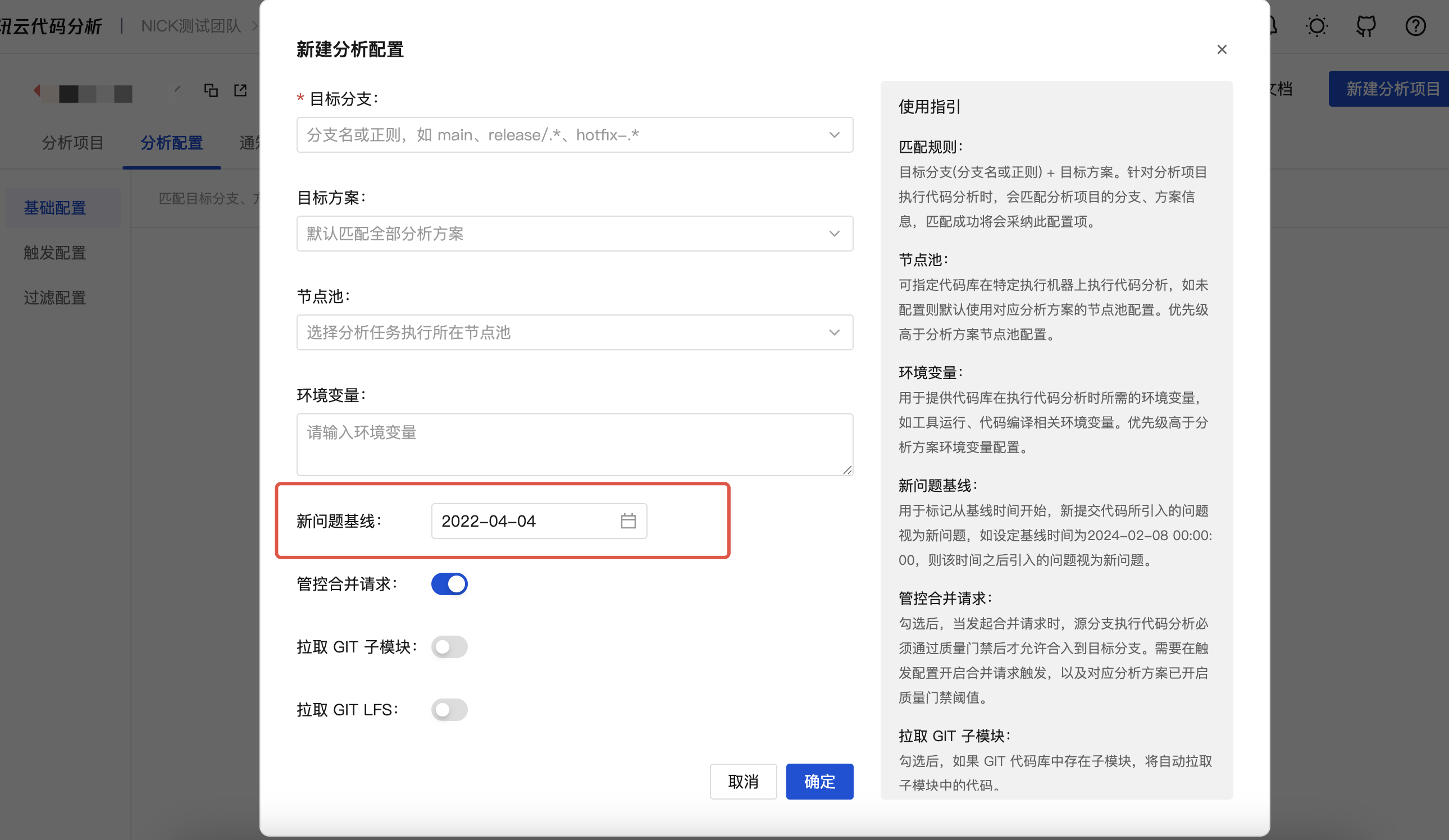
| Issue Baseline | Ignore issues by configuring an issue baseline time. |
Comment Ignoring
Tips
Comment-based ignoring better adapts to cloud-native environments, is tool-agnostic, and avoids code proliferation across branches, repositories, file systems, etc., which would otherwise require handling duplicate issues.
- Comment-based ignoring can evolve with source code iterations, while other issue ignoring methods rely on the platform.
Ignoring Format
Example: // NOCA:RuleName(IgnoreReason),RuleName(IgnoreReason),...
Comment location: end of the issue line or the line above the issue line.
- If it is a file-type rule and the issue line is the first line of the file, add the comment to the first line.
Comment format: Follow the commenting syntax of the corresponding language, see examples.
NOCA: Required, an ignore marker separated from the rule name by an English colon.
Rule name: Required, multiple rules separated by English commas.
- The rule name for cyclomatic complexity is:
CCN.
- The rule name for cyclomatic complexity is:
Ignore reason: Required, placed in English parentheses after the rule name to explain why the rule issue is being ignored.
Tips
Take C++ code comments as an example:
- Ignore a single rule:
// NOCA:DirtyWord(FalsePositive, not a swear word in this context). - Ignore multiple rules:
// NOCA:DirtyWord(FalsePositive, not a swear word in this context),invalid-name(Other, keep old code unchanged). - Ignore a file-type rule: Add
// NOCA:LowCommentRatio(DesignChoice, logic is simple, no need for excessive comments)to the first line.
Code Comment Ignoring Examples for Various Languages
The file extensions mentioned below are case-insensitive.
Applicable files: .c, .cpp, .h, .hpp, .m, .mm, .swift, .go, .cxx, .cc, .cs, .json, .proto, .pch, .mod, .java, .kt, .js, .jsbundle, .jsx, .ts, .tsx, .vue, .css, .scala, .dart.
// C++ Program Demo

#include <iostream>

int main() {
    // NOCA:DirtyWord(FalsePositive, not a swear word in this context)
    std::cout << "这是一个傻瓜式教程。";

    std::cout << "这是一个傻瓜式教程。";  // NOCA:DirtyWord(FalsePositive, not a swear word in this context)
    return 0;
}
Applicable files: .py.
def main():
    '''
    Foolproof creation  # NOCA:dirty_check(FalsePositive),DirtyWord(FalsePositive, "foolproof" here doesn't mean stupid)
    '''
    # NOCA:DirtyWord(FalsePositive)
    print("这是一个傻瓜式教程。")
    print("这是一个傻瓜式教程。")  # NOCA:DirtyWord(FalsePositive)
Applicable files: .lua.
<?php
    # NOCA:DirtyWord(FalsePositive, not a swear word in this context)
    echo "这是一个傻瓜式教程。<br>";

    // NOCA:DirtyWord(FalsePositive, not a swear word in this context)
    echo "这是一个傻瓜式教程。";

    echo "这是一个傻瓜式教程。"; // NOCA:DirtyWord(FalsePositive, not a swear word in this context)
?>
Applicable files: '.yml', '.yaml', '.toml', '.conf', '.properties', '.sh'
version: '2.0'
stages:
- stage: demo-test
  tasks:
  # NOCA:DirtyWord(FalsePositive, not a swear word in this context)
  - title: Foolproof tutorial
    message: "这是一个傻瓜式教程"  # NOCA:DirtyWord(FalsePositive, not a swear word in this context)
Applicable files: '.md'
# MarkDown Demo

## Operation Guide Document
[Comment]: NOCA:DirtyWord(FalsePositive, not a swear word in this context)
1. 这是一个傻瓜式教程。

<!-- NOCA:DirtyWord(FalsePositive, not a swear word in this context) -->
2. 这是一个傻瓜式教程。
Applicable files: '.ini'
; Parameter configuration file

[config]
; NOCA:DirtyWord(FalsePositive, not a swear word in this context)
message: 这是一个傻瓜式教程
Applicable files: .xml, .html, .htm, .vcproj, .vcxproj.
<?xml version="1.0" encoding="UTF-8"?>
<?xml-stylesheet type="text/css" href="test.css" ?>
<root>
    <book-name>My Magic Book</book-name>
    <book-author>author: Harry Potter</book-author>
    <!-- NOCA:DirtyWord(FalsePositive, not a swear word in this context) -->
    <short-desc>这是一个傻瓜式教程</short-desc>
</root>
Applicable files: .lua.
-- NOCA:DirtyWord(FalsePositive, not a swear word in this context)
print("这是一个傻瓜式教程!")

print("这是一个傻瓜式教程!")  -- NOCA:DirtyWord(FalsePositive, not a swear word in this context)
Platform Ignoring
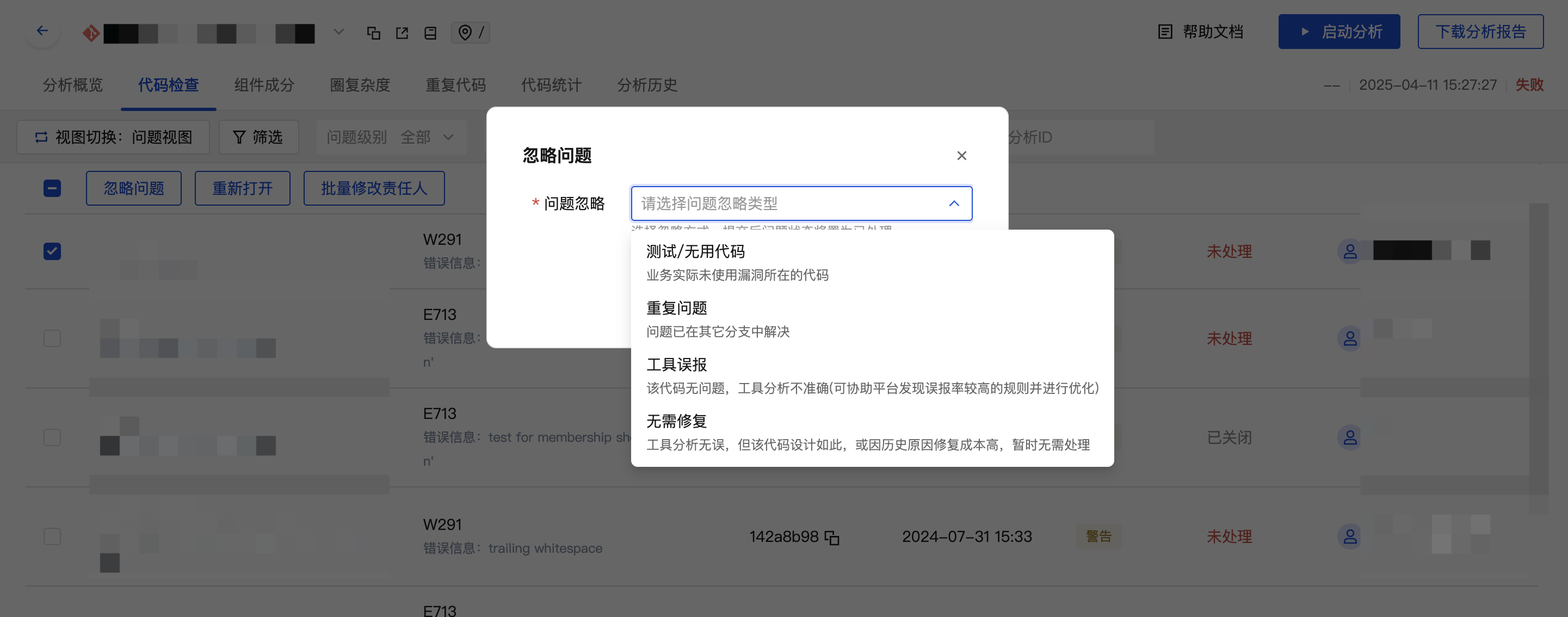
You can directly ignore issues via operations on the platform, which will mark the issue resolution method as follows:
| Resolution Method | Description |
|---|---|
| Test/Unused Code | The code where the vulnerability resides is not actually used by the business. |
| Duplicate Issue | The issue has already been resolved in other branches. |
| Tool False Positive | The code has no issues; the tool analysis is inaccurate (this can help the platform identify rules with high false positive rates for optimization). |
| No Fix Needed | The tool analysis is accurate, but the code is designed this way or has high repair costs due to historical reasons, so no immediate action is required. |
Global Issue Ignoring
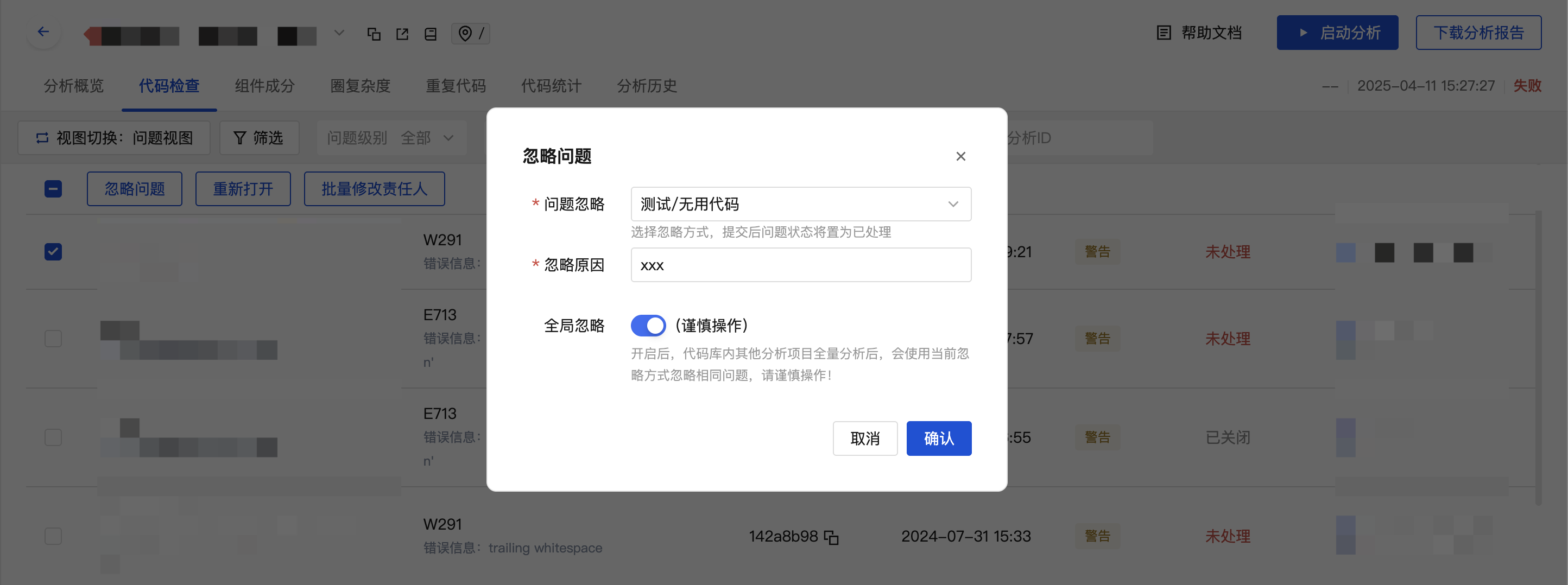
If you want other analysis projects in the code repository to automatically ignore the same issues when they are detected, you can configure global issue ignoring.
Warning
If a global ignore operation is performed, after other analysis projects in the code repository complete a full analysis, the same issues will be ignored using the current ignoring method. Please proceed with caution!
Effective policy: Other analysis projects will only ignore the same issues after completing a full analysis, not immediately after the operation.
Exclusion scope: If an analysis project has disabled the Issue Ignoring Sync Switch, the same issues will not be synced and ignored.
Path Filtering
Tips
Typically applicable when the files containing the relevant issues are test/unused code files, requiring directory/file path filtering to ignore the issues.
Please refer to the Path Filtering Configuration Documentation.
Rule Removal
Tips
Typically applicable when, after evaluating a rule, it is deemed ineffective or not a current priority. You can ignore issues by removing/blocking the corresponding rule.
- The issue resolution method will be marked as Rule Removal.
Please refer to the Rule Configuration Documentation.
Issue Baseline
Tips
Typically applicable when an analysis project has a large number of issues but there is no desire to address historical technical debt. You can ignore issues by configuring a new issue baseline time.
- The issue resolution method will be marked as Historical Issues.
Please refer to the Basic Configuration Documentation.