
API Documentation
Click to access the API documentation address
Main OpenAPI Documentation, which contains data such as code repository information and project configurations.
Analysis OpenAPI Documentation, which contains interfaces for result data such as code scanning, code measurement, and code auditing.
API Request Prefix
Main OpenAPI:
{origin}/server/main/api/Analysis OpenAPI:
{origin}/server/analysis/api/
The {origin} refers to the domain name part of the URL used by the current browser to access this document, eg: https://tca.tencent.com.
Authentication Method
Add the following format to the request headers:
// Add to request headers
{
  "TCA-USERID": "{Current user-id, e.g., xiaoming}",
  "TCA-TICKET": "{TCA-TICKET}",
  "TCA-TIMESTAMP": "{Current timestamp, e.g., 1614565593}",
}
Python Example
from time import time
from hashlib import sha256

def get_headers(user_id, token):
    timestamp = int(time())
    token_sig = "%s%s#%s#%s%s" % (timestamp, user_id, token, user_id, timestamp)
    ticket = sha256(token_sig.encode("utf-8")).hexdigest().upper()
    return {
        "TCA-USERID": user_id,
        "TCA-TIMESTAMP": str(timestamp),
        "TCA-TICKET": ticket
    }
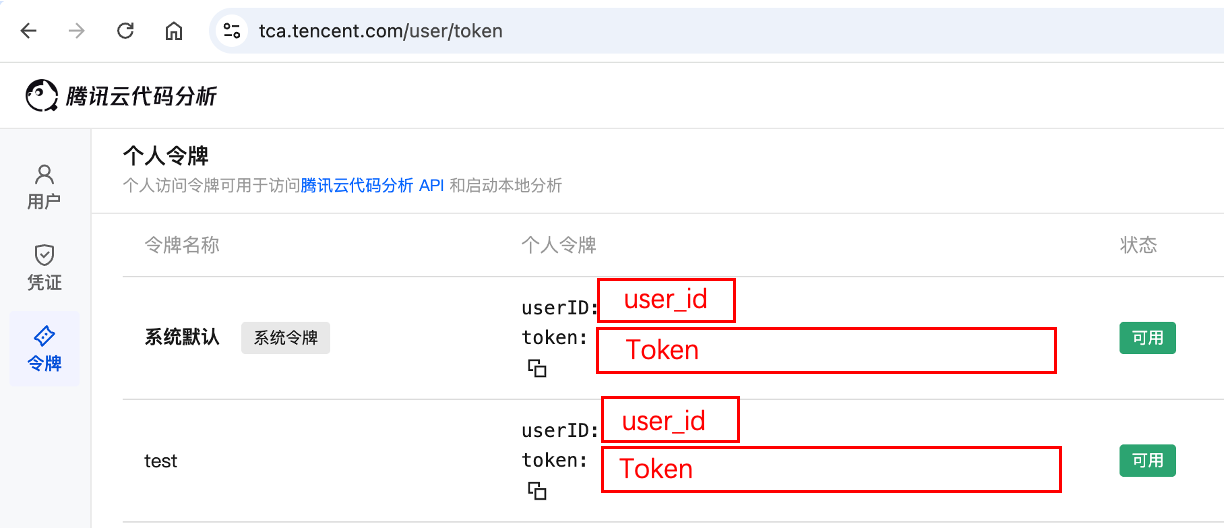
Obtain the locations of user_id and token from Personal Center - Personal Token:
Request Example
How to obtain the team identifier and project identifier
The team identifier (org_sid) and project identifier (team_name field) can be obtained from the access URL.
For example, the URL of the analysis project list page: {origin}/t/{org_sid}/p/{team_name}/repos/{repo_id}/projects
A URL like: {origin}/t/LRgg3msnZzL/p/tca/repos/20/projects
The corresponding team identifier org_sid is LRgg3msnZzL, and the project identifier team_name is tca.
Request Example
import requests
# Assumptions:
# Current domain is http://tca.com/, current org_sid is helloworld
# Retrieve registered code repositories under the hellotca project in the helloworld team
url="http://tca.com/server/main/api/orgs/helloworld/teams/hellotca/repos/?limit=12&offset=0"
headers = {
  "TCA-USERID": user_id,
  "TCA-TIMESTAMP": str(timestamp),
  "TCA-TICKET": ticket
}

response = requests.get(url, headers=headers)
print(response.json())
# Result as follows:
{
    "data": {
        "count": 1,
        "next": null,
        "previous": null,
        "results": [
            {
                "id": 23,
                "name": "repo_name",
                "scm_url": "http://git.repo.com/group/repo_name",
                "scm_type": "git",
                "branch_count": 1,
                "scheme_count": 1,
                "job_count": 1,
                "created_time": "2021-05-14 02:34:44.509118+00:00",
                "recent_active": {
                    "id": 27,
                    "branch_name": "master",
                    "active_time": "2021-05-14 02:34:44.509118+00:00",
                    "total_line_num": 1,
                    "code_line_num": 1
                },
                "created_from": "tca",
                "creator": {
                    "username": "author",
                    "nickname": "author",
                    "status": 1,
                    "avatar": "url",
                    "org": "org_name"
                },
                "symbol": null,
                "scm_auth": {
                    "id": 1,
                    "scm_account": null,
                    "scm_oauth": null,
                    "scm_ssh": {
                        "id": 1,
                        "name": "test",
                        "scm_platform": 2,
                        "scm_platform_desc": null,
                        "user": {
                            "username": "username",
                            "nickname": "nickname",
                            "status": 1,
                            "avatar": "url",
                            "org": "org_name"
                        }
                    },
                    "auth_type": "ssh_token",
                    "created_time": "2021-05-14T10:34:44.552859+08:00",
                    "modified_time": "2021-05-14T10:34:44.552887+08:00"
                },
                "project_team": {
                    "name": "test",
                    "display_name": "测试",
                    "status": 1,
                    "org_sid": "test"
                }
            }
        ]
    },
    "code": 0,
    "msg": "Request successful",
    "status_code": 200
}
Pagination Method
The platform uses the limit and offset parameters to handle pagination for returned data.
Example
For example: server/main/api/orgs/<org_sid>/teams/?limit=12&offset=12 retrieves data starting from the 13th entry.